
Showing posts with label Tricks. Show all posts
How to remove ‘powered by Oxwall’

"That’s exactly what I described as ungrounded anti-competitive fears. It takes years of building and maintaining real community to understand that software is only start and real commitment can’t be “cloned”. If you are good at establishing your community people will not run to someone who installs the same piece of software.
Software is overrated. It should be “invisible” to users. Community building strategy is often mistakenly an afterthought. You should first be able to make people want to stay with you for some good reason and then choose software that suits your needs."
This was the reply of an oxwall admin to an oxwall developer who wanted to remove the oxwall attribution link from his site for fear of competitors. I totally agree with the oxwall admin and I would like to ask you why you want to remove the oxwall attribution link.
Though it is strictly against the oxwall policy to remove the attribution link from your site but they are lenient enough to grant users a chance of donating $50 to remove the link legally.

Today i'm going to show you how to remove the link without violating their policy.
Read oxwall official position.
Donate $50 USD
Login to your cpanel/ftp
Locate /ow_themes
Open your current theme folder
Open master_pages
Edit dndindex.html -Find and delete this code:
<div class="ow_copyright">
{text key='base+copyright'}
</div>
Save.
Still on master_pages
Edit general.html -Find and delete this code:
<div class="ow_copyright">
{text key='base+copyright'}
</div>
Save the code.
Please note that you need to enable dev_mod before your changes will reflect.
I believe the logo is really at the perfect spot and doesn’t pose any problems and hell, I wouldn’t want to remove it even if I could! you should be proud to use Oxwall software and have the badge there – it’s unobtrusive anyway!
I’ve recommended Oxwall to countless people and will continue to do so!
Download Oxwall Software without oxwall Software Logo

Hack any Remote Computer Using IP Address
You may want to hack any website and so with it want to popularize your blog or anything with it or just take away the database information. But in this kinda hacking technique we are just playing with the server computer instead of the Administrator one. Let's take an Example, "www.google.com" is a seperate server instead of the personal computer.
 There are many who wished to Access your friend's computer from your home itself which is again based on hacking only and it is only done when your friend's computer is online means your friend might have opened it for some work. If by chance its not connected to the internet, allowing that external IP Remote hacking is
yet impossible for you.
Here we have some of the steps you must look at
Now the First thing you do is to Find the Victim's IP Address. To do this, you need to Ping for it in the Command Prompt.
For example, "ping www.google.com" - To retrieve the IP address of google.com
 This is how we would get the IP Address of the Victim's Website Easily
Now if you wanna do this type of hacking on your friend's computer then its a little bitcomplicated if it has a dynamic IP which changes timely. You can do this by simply talking your friend about it, just Use his/her computer and go here tracemyip Now after going here you will easily get to know abbout his computer IP Address and just pen it down somewhere.
Now Just do a check onto whether his/her computer is online or not, for that just ping his/her IP address on your computer, if its online then "Reply from:.." will pop up there or else it would display "Request timed out".
Now After that Scan the Open Ports, its like closed doors without locks in it, we can get in but can't get out easily.
Just Use Advanced Port Scanner to scan all open and venerable ports.
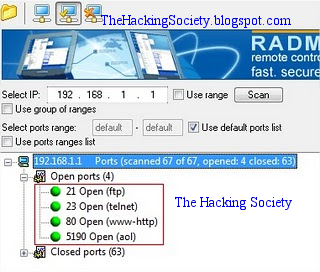 Now after getting the Victim's IP Address and Open Port , then you can use the telnet feature to try accessing it.
Before using Telnet make sure you have enabled telnet on your PC, if you dont have then install it from here:
Go to: Control Panel >> Add or Remove Programs >> Add Windows Components, then open command prompt and use the telnet command to access the IP address.
Use the following syntax for the connection
 You will be prompted for login information.
 In this way, you will be able to hack remote computer using just the IP address. !!
Enjoy With Us Like and Share Us Below :)
yet impossible for you.
Here we have some of the steps you must look at
- Now the Very first thing you do is to confirm out which site you wanna hack onto or the computer.
- Now Trace their IP Address.
- Confirm whether that IP Address is Online or Not.
- Now Scan the Open Ports and check the doors Venerability for venerable posts
- Brute Force both the Username and Password
Now the First thing you do is to Find the Victim's IP Address. To do this, you need to Ping for it in the Command Prompt.
For example, "ping www.google.com" - To retrieve the IP address of google.com
Now if you wanna do this type of hacking on your friend's computer then its a little bitcomplicated if it has a dynamic IP which changes timely. You can do this by simply talking your friend about it, just Use his/her computer and go here tracemyip Now after going here you will easily get to know abbout his computer IP Address and just pen it down somewhere.
Now Just do a check onto whether his/her computer is online or not, for that just ping his/her IP address on your computer, if its online then "Reply from:.." will pop up there or else it would display "Request timed out".
Now After that Scan the Open Ports, its like closed doors without locks in it, we can get in but can't get out easily.
Just Use Advanced Port Scanner to scan all open and venerable ports.
Before using Telnet make sure you have enabled telnet on your PC, if you dont have then install it from here:
Go to: Control Panel >> Add or Remove Programs >> Add Windows Components, then open command prompt and use the telnet command to access the IP address.
Use the following syntax for the connection
Enjoy With Us Like and Share Us Below :)
Hide Some Facebook Friends Easy way

It’s a hidden feature which can be enabled by following these steps:
Step 1: Open your account on Facebook.
Step 2: Click on the “Chat” option which is present on the lower right side of your profile.
Step 3: There you will find two options. Choose “Friend List”.
Step 4: There you will find an option of creating a new list. Name it, for example, “Blacklisted”.
Step 5: Now, select or write the names of the people with whom you don’t want to chat.
Step 6: Set the status as offline for this chosen list.
Hide From Some Facebook Friends
Reference : http://pctipstrickshacks.comGet Facebook Messenger for Windows7 and XP

If you’re a casual Facebook user that mainly uses the popular social network to message and chat with friends, but prefers to avoid things like the extreme amount of apps, invites, games and other add-ons that the site now offers, you may want to consider using Facebook Messenger for Windows, to simplify your Facebook usage. Facebook has mobile apps for Android and iOS, but the Windows desktop Facebook app is a bit different.
Facebook integration with other technology based products is becoming a bit more common. For example, Apple’s upcoming mobile OS that powers the iPhone and iPad, iOS 6, is set to have core Facebook integration. With FB Messenger, you can add a Facebook app to the Windows operating system.
To get started, launch a web browser and navigate to the Facebook homepage. From there, proceed to sign-in to your account.
Once signed in, simply jump to the Facebook Messenger for Windows page.
Click the Install Now button to begin downloading the Facebook desktop software. Facebook will prompt you to begin downloading Messenger. Click the Save File button.
Double click the downloaded FB file to begin the install. From here, the program will download the actual app and install it
With the software installed on a Windows PC, it should auto launch the desktop app. If not, manually open Facebook Messenger using the path Start > All Programs > Facebook > Facebook Messenger.
From there, you will be presented with a basic Facebook login screen:
Proceed to enter your Email address and Password for Facebook and click the Log In button. From here, you will instantly be presented with the simplistic Facebook Messenger for Windows interface.
Note that aside from basic Facebook chat, this app also provides functions to accept friend requests, view Facebook messages, search Facebook and even view notifications, all from your desktop.
The app is somewhat Skype like or AIM like in nature, but this simplicity is what some casual Facebook users may find preferable.
That’s basically all there is to it. With this basic app, you can use the core, social features of Facebook in a simple, minimalistic desktop window, rather than having to sign in to the site from a web browser. This method of using your Facebook account also prevents several bothersome things that many people may not use, such as the games, apps, surveys, and other crazy things on Facebook these days.
Get a Facebook account, download this app, and use Facebook that way for less games and more simplicity. Thank you for stopping by the site for today’s post.
Download Oxwall Software without Logo

Oxwall® is unbelievably flexible and easy to use PHP/MySQL social networking software platform.
Its flexibility is an extremely easy way to change the way it works using Oxwall plugins. These plugins are complete units of functionality that can be used for various purposes.
We take special care about core and plugins compatibility so any updates are easy like a breeze. Just click that button in the admin area.
Oxwall offers unseen level of efficiency when you need a full-featured, working site.
Open source
With Oxwall we are all about open source values. Anyone can use this software for any purpose including commercial, and anyone's help is much appreciated.
Oxwall's mission is as dull and unsexy as it gets: provide the best online community software in the world.
Is it for me?
Oxwall is used for a wide range of projects starting from family sites and custom social networks to collaboration tools and enterprise community solutions.
Whether you are a freelance developer willing to streamline your work for client projects; an individual willing to create a community site; or a brand planning to set up a destination for your customers - Oxwall is for you.
Subscribe to:
Posts
(
Atom
)


